

⚡ Quick summary
- Claude GTM Mesh is not an official Anthropic product — it's a tool QuickEnrich built using Claude Code to unify all your GTM tools in one place.
- It was inspired by a satirical LinkedIn post that took on a life of its own — and we turned it into something real.
- The app connects your signals, enrichment providers, CRM, and outreach tools into a single, live dashboard.
- You can download the artifact and template to run it yourself via Claude Code or use it within QuickEnrich (coming soon)
What is Claude GTM Mesh?
Claude GTM Mesh is not an official Anthropic product.Anthropic didn’t build it or endorse it—and it’s not connected to them. The team at QuickEnrich put this thing together using Claude Code , Anthropic’s own agentic coding tool. We basically wanted to see what it looks like when you really unify everything for go-to-market teams in one workspace.
Here’s where the idea comes from: GTM teams are buried in browser tabs. Your CRM sits in one place, enrichment tools in another, your outreach sequencer somewhere else, and intent signals floating around in a different window. These tools don’t sync in real time. You’re stuck copying, pasting, and patching pieces together, trying to keep your pipeline up to date between a bunch of scattered apps.
Claude GTM Mesh tries to solve all of that. It pulls every core GTM tool—enrichment, CRM sync, signals, outreach—into one dashboard. You see everything happening across your go-to-market ops in real time, all in one spot. Say there’s a new signal—a funding announcement, a job change, someone engaging on LinkedIn. GTM Mesh automatically enriches the data, syncs it to your CRM, and kicks off the right outreach, without you bouncing between tools.
We built the whole thing inside Claude Code. That’s the other cool part—it shows how much you can do now with just good ideas and the right AI-powered tools. You don’t need a squad of engineers to put together sophisticated GTM software anymore. Just some vision and the right tech.
The History of Claude GTM Mesh
It started with a joke. Or at least, something that read like one.
A few weeks ago, Haris Odobasic — Author of the RevOps Pendulum that came out 3 days ago — posted a satirical piece about a fictional AI product called "Claude GTM Mesh." It was funny and it clearly struck a nerve because it spread fast. Here's a blurb on the post:
The post is satire, of course — deals classified as "hope," a methodology called MEDDIC-F (the F is for "feelings"), a system asking the CRO if he's okay during a QBR. It's ridiculous. But underneath the term is Claude GTM Mesh is a real product that we have already been working on here: It is a good term for a tool that actually connects across your entire GTM motion so you are keeping everything in sync.
So we built it. Not the version that submits revised commission plans to HR. The real version: a working, downloadable GTM Mesh app built with Claude Code that connects your signals, enrichment, CRM, and outreach tools into one live dashboard. See below for what it looks like and how you can download your own Claude artifact and app today.
Inside the Claude GTM Mesh Application
The app has four core areas: Integrations, Signals, Enrich / Sync, and Actions. Here's a walkthrough of each.
🔌 Integrations
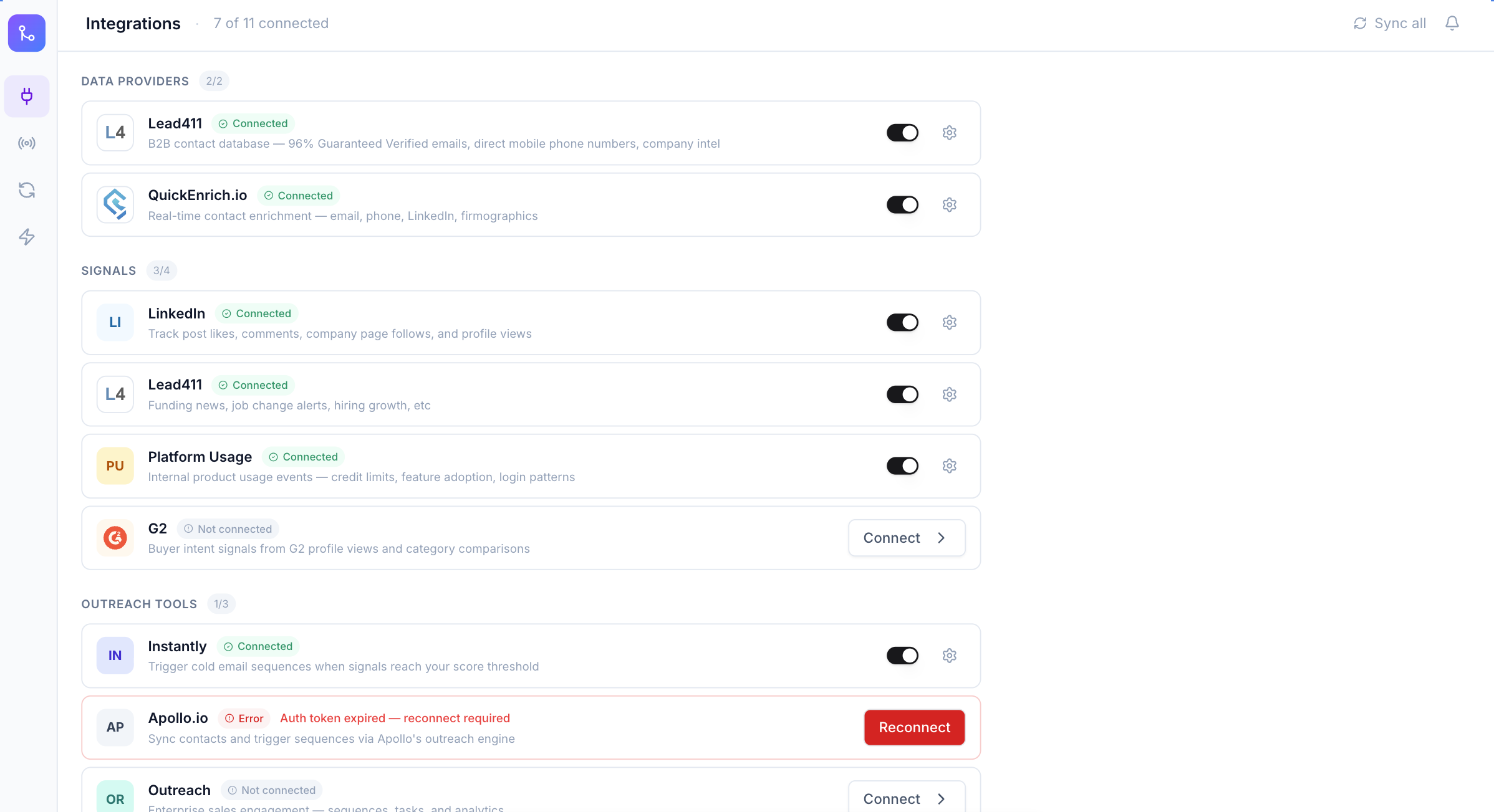
The Integrations page is where you connect your stack. The app organizes integrations into three categories: Data Providers (Lead411 are available QuickEnrich, but you can add your own), Signals (LinkedIn, Lead411 for funding/job changes, Platform Usage, and G2 for buyer intent), and Outreach Tools (Instantly, Apollo.io, Outreach). CRM connections round out the page — HubSpot and Salesforce.
In the example setup shown, 7 of 11 integrations are connected. HubSpot and Instantly are live and syncing, while G2, Outreach, and Salesforce show as available to connect. Apollo.io is flagged with an auth error requiring a reconnect — the app surfaces these issues directly rather than letting them fail silently.
📡 Signals Dashboard
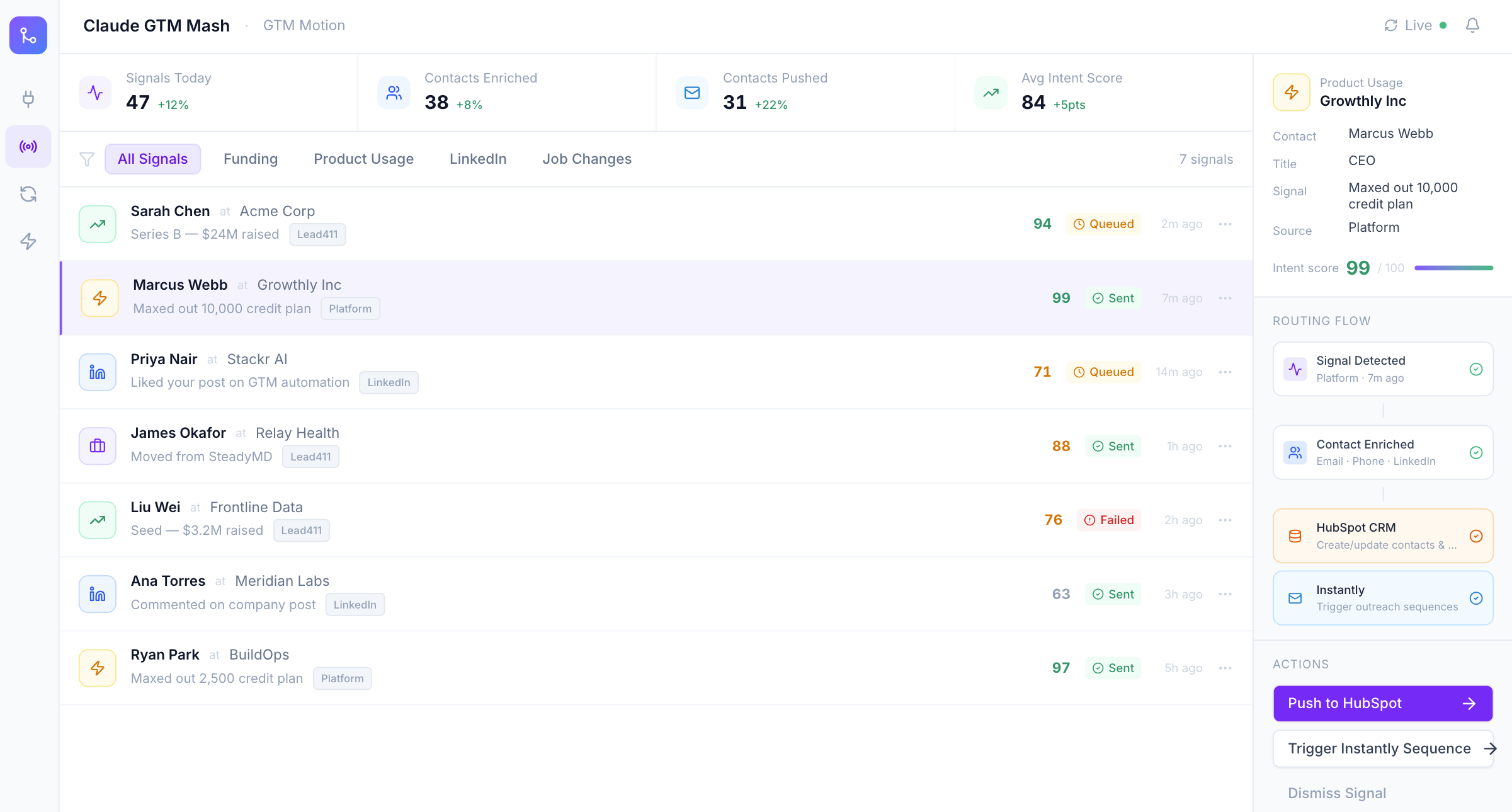
The Signals view is the heartbeat of the app. It aggregates buying intent signals from all your connected sources in real time — funding rounds, product usage events, LinkedIn engagement, job changes — and surfaces them in a unified feed with intent scores, contact details, and routing status.
Each signal shows the contact, their company, what triggered the signal, an intent score (0–100), and whether the record has been queued, sent to outreach, or failed enrichment. Click any row and a detail panel opens on the right, showing the full routing flow: signal detected → contact enriched → pushed to HubSpot CRM → Instantly sequence triggered. The top bar keeps a live count of signals today, contacts enriched, contacts pushed, and average intent score.
⚙️ Enrich / Sync
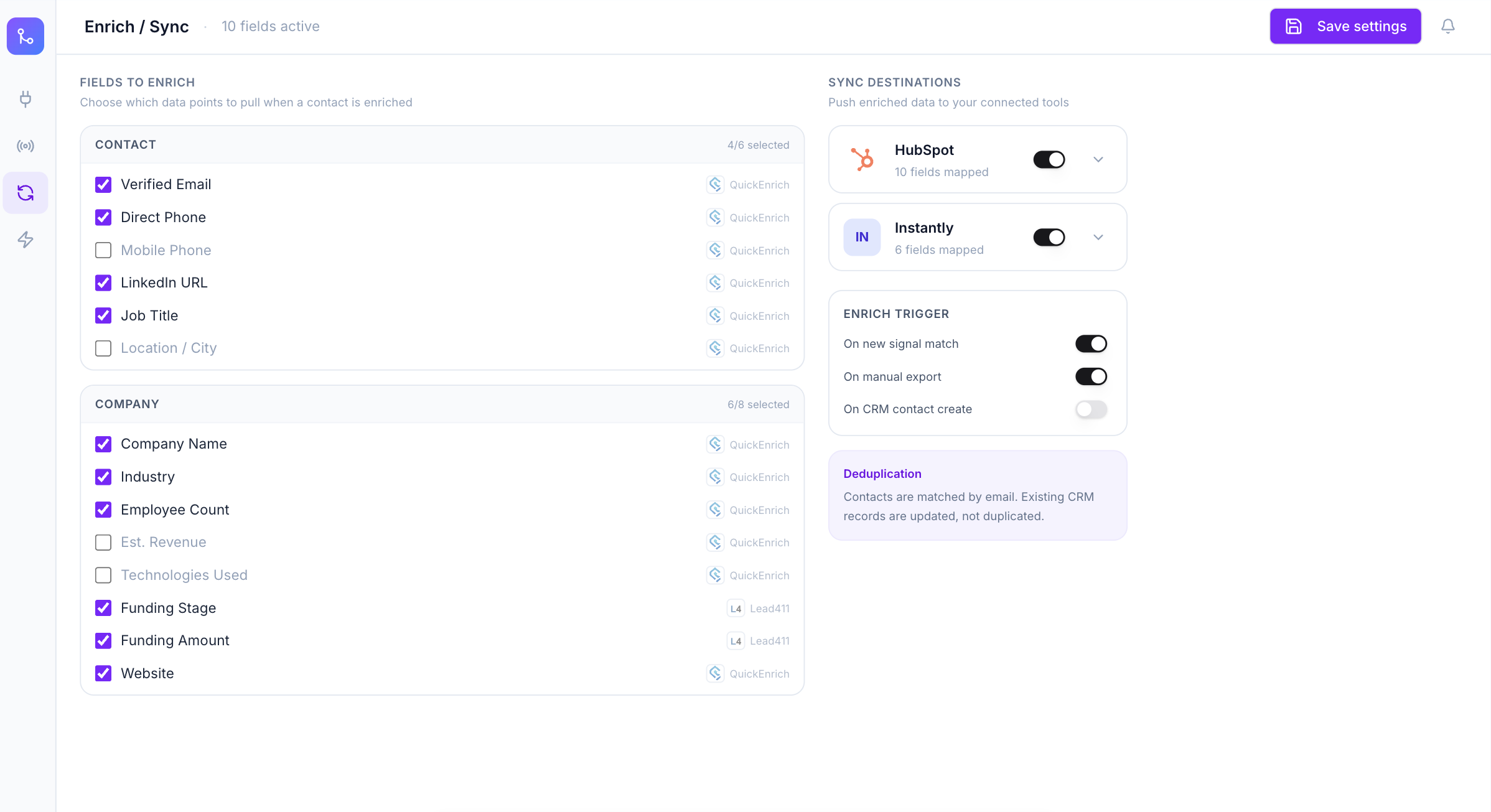
The Enrich / Sync view lets you define exactly what data gets pulled when a contact is enriched and where it gets pushed. On the left, you select contact fields (verified email, direct phone, LinkedIn URL, job title) and company fields (name, industry, employee count, funding stage, funding amount, website) — each tagged with its source provider. On the right, you configure sync destinations and trigger rules.
In the example configuration, HubSpot has 10 fields mapped and Instantly has 6. Enrichment triggers are set to fire on new signal matches and on manual export. The Deduplication panel at the bottom explains the matching logic: contacts are matched by email, and existing CRM records are updated rather than duplicated.
⚡ Actions
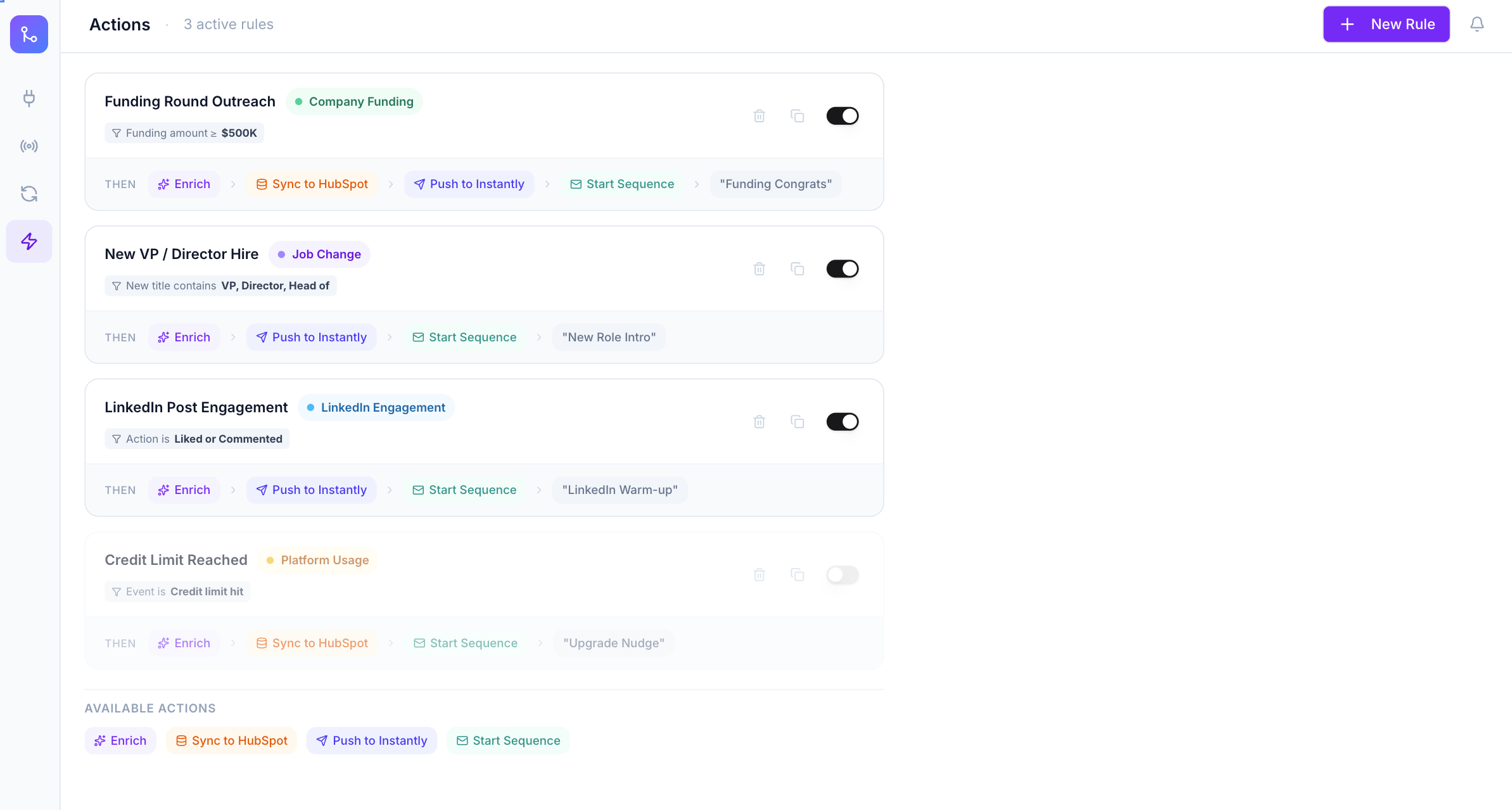
Actions is where the automation lives. Each rule defines a signal type (Company Funding, Job Change, LinkedIn Engagement, Platform Usage), a condition, and a sequence of automated steps to execute when the condition is met.
The example setup shows four rules: Funding Round Outreach (funding amount over $500K → enrich → sync to HubSpot → push to Instantly → start "Funding Congrats" sequence), New VP / Director Hire (job change with title containing VP, Director, or Head of → enrich → push to Instantly → start "New Role Intro" sequence), LinkedIn Post Engagement (liked or commented → enrich → push to Instantly → start "LinkedIn Warm-up" sequence), and Credit Limit Reached (platform usage event → enrich → sync to HubSpot → start "Upgrade Nudge" sequence, currently toggled off).
Real-time intent signals across funding, job changes, LinkedIn, and product usage — all in one view with intent scores.
Connect Lead411, QuickEnrich, LinkedIn, HubSpot, Salesforce, Instantly, Apollo, Outreach, and G2.
Configure exactly which fields to pull, from which providers, and where to push them — with deduplication built in.
Signal-triggered workflows that auto-enrich, sync to CRM, and launch outreach sequences without manual steps.
How to get it
Claude GTM Mesh was built as a Claude Code artifact — which means you can download the template and run it yourself. Everything was created using Claude Code with no traditional engineering team required. We'll be releasing the downloadable artifact, template, and full workflow documentation so you can adapt it to your own stack, signal sources, and CRM setup.
If you want to be notified when the download is live, or if you're already using QuickEnrich as your enrichment layer inside a setup like this, get in touch with us here.
Start Growing with QuickEnrich
Take control of your B2B data and enrich it with ease.
Start for Free
Start Growing with QuickEnrich
Take control of your b2b data and enrich it with ease.